Remote work has changed everything about how we communicate. Video calls replaced water cooler conversations. Virtual meetings became the new conference rooms. And somewhere along the way, we realized our laptop cameras and microphones just weren’t cutting it anymore. The Insta360 Wave and Link 2 combo promises to solve these exact problems with AI-powered audio and professional-grade video. But does it actually deliver? After weeks of testing both devices in real-world scenarios, here’s everything you need to know before making the investment.
The Common Problem for Streamers and Remote Workers
Let’s be real here. If you’re someone who spends hours in video meetings every week, you know the drill. Your laptop camera makes you look washed out. The built-in mic picks up every keyboard click and random background noise. And trying to remember everything discussed while simultaneously taking notes? That’s a recipe for cognitive overload.
I’ve been there. Multiple meetings back to back, trying to stay engaged while frantically typing notes, missing important points because you can’t do both well at the same time. Meeting fatigue is real, and it’s not just about being tired. It’s about feeling like you’re constantly behind, always missing something crucial that was said five minutes ago.
That’s exactly why creators and remote workers need better tools. Not just any tools, but AI-enabled ones that actually make life easier instead of adding more complexity to an already complicated workflow.
Where the Insta360 Wave Excels
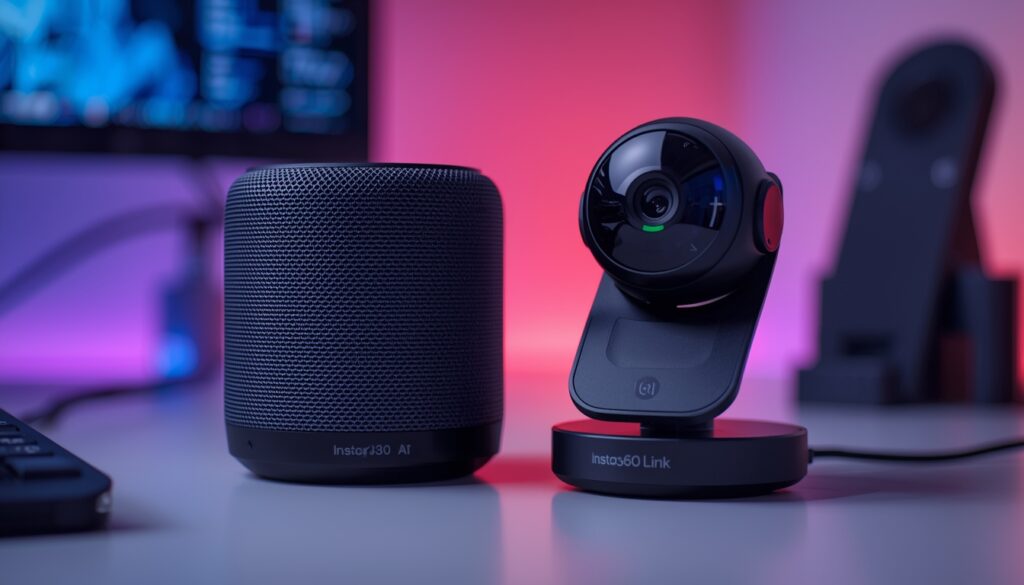
Now here’s where things get interesting. The Wave isn’t your typical conference speakerphone. The first thing you notice is the design. It’s compact, about the size of a soda can, which means you can actually throw it in your bag and take it anywhere. None of that bulky equipment that stays permanently glued to your desk.
The portability factor is huge for people who work from different locations. Coffee shop meetings? Client visits? Recording interviews on location? The Wave handles all of it without breaking a sweat. And for vloggers who need quality audio on the go, this thing is basically a portable recording studio that fits in your hand.
What really impressed me was how it rises up when you power it on. There’s this satisfying mechanical sound, and the microphone array elevates itself above the desk. It’s not just for show, either. That elevated position actually improves sound quality by reducing vibrations from the desk surface and minimizing echo from nearby objects.
Stunning 4K Video Quality
Let’s talk about the Link 2 camera for a minute, because this is where things really shine. I’ve tested my fair share of webcams over the years, and most of them fall into the “good enough” category. Link 2 is different.
The image quality is genuinely impressive. We’re talking true 4K resolution at 60fps, not some upscaled nonsense. There’s a 2-axis gimbal inside that physically moves the camera to track you around the room. This isn’t digital zoom that makes everything look pixelated. It’s a smooth, natural movement that keeps you perfectly framed whether you’re standing at a whiteboard or sitting at your desk.
Low-light performance is surprisingly good, too. Evening calls don’t turn you into a dark silhouette anymore. The phase detection autofocus keeps everything sharp, and there’s this natural bokeh effect that makes the background slightly blurred. Honestly, it looks more like you’re using a cinema camera than a webcam.
The gesture control feature is pretty clever. Wave your hand and the camera zooms in or out. The precision tracking reminds me of how important sensitivity settings are for peripherals. Just like choosing the right DPI for your mouse can make or break your workflow, the Link 2’s tracking accuracy determines whether your presentations look professional or chaotic. No need to fiddle with software controls mid-presentation. Just communicate naturally and let the camera do its thing.
Crystal-Clear Audio from the Microphone Array
Here’s where the Wave really earns its keep. Eight microphones strategically placed around the device, capturing sound from up to 16 feet away. That’s a lot more range than your laptop mic that starts sounding hollow once you move three feet back.
The AI noise cancellation isn’t just marketing speak either. According to TechRadar’s independent testing, it actively identifies and eliminates over 300 different types of background noise. Keyboard clicks, street traffic, air conditioning hum – all filtered out so your voice comes through crystal clear.
What sets this apart from typical conference microphones is the pickup pattern options. You’ve got omnidirectional mode for group meetings, cardioid for solo presentations, and even figure-8 mode for two-person interviews. The audio quality stays consistent across all modes, which isn’t always the case with other devices.
For streaming and podcast work, the Wave delivers broadcast-quality sound without needing a separate professional microphone setup. The 48kHz sampling rate captures all the subtle details in your voice, making it sound full and natural rather than thin and distant.
Link Controller Software – Full Creative Control
The desktop software gives you complete control over both the Wave and Link 2. You can adjust audio settings, switch between different video modes, and even activate whiteboard mode when you’re presenting at a board. The camera automatically tilts to capture both you and whatever you’re writing.
What’s really useful is how everything integrates seamlessly. You’re not juggling multiple apps or dealing with compatibility issues. One interface controls both devices, and it just works. The software lets you fine-tune image quality, adjust 4K resolution settings, and set up live streaming parameters all from one place.
AI Transcriptions – Meeting Notes Made Easy
This is where the Wave becomes more than just a speakerphone. The AI transcription feature actually saves you time instead of just being another gimmick to ignore.
After a meeting, you get automatic transcription in 99 languages. But here’s what makes it useful: the system doesn’t just dump raw text at you. It generates smart summaries with clear action items, identifies different speakers, and even creates custom templates based on your meeting type. Interview format? Brainstorming session? Executive meeting? Each gets formatted differently.
The transcription happens fast, too. A one-hour meeting gets processed in less than two minutes. Compare that to traditional manual transcription, and you’re saving hours of work.
For productivity, this is huge. You can focus on the actual conversation instead of frantically scribbling notes. The AI handles the documentation while you handle the discussion. That’s how technology should work.
Flexible, Mobile, and Independent Setup
Three connection options make this incredibly versatile. USB-C for direct computer connection, Bluetooth for wireless pairing, or a dedicated wireless dongle for more stable connections. Works with Windows, Mac, doesn’t matter. Just plug in and go.
Battery life is solid at 12 hours. You can run multiple meetings throughout the day without worrying about charging. When you do need to charge, it takes about five hours to reach full capacity.
The Link 2 mounts magnetically on top of the Wave, drawing power through contact points. One USB-C cable to your laptop powers both devices. Clean, simple, no cable mess on your desk.
Platform compatibility is excellent. Zoom, Teams, OBS, Google Meet, whatever you use, it integrates without issues. You’re not locked into any specific ecosystem.
Microphone Quality Comparison – Wave vs Link 2
Both devices have impressive audio capabilities, but they serve different purposes. Understanding the differences helps you choose the right setup for your needs. Here’s a detailed comparison:
| Feature | Insta360 Wave | Link 2 |
|---|---|---|
| Microphone Array | 8-mic 3D array | Dual built-in mics |
| Pickup Range | Up to 16 feet | 3-6 feet optimal |
| Pickup Patterns | 5 modes (Omni, Cardioid, Supercardioid, Figure-8, Stereo) | Standard omnidirectional |
| Noise Cancellation | Advanced AI (300+ noise types) | Basic AI noise reduction |
| Sample Rate | 48kHz Hi-Fi | Standard quality |
| Best For | Group meetings, interviews, podcasts, content creation | Solo calls, quick meetings, desk work |
| Internal Storage | 32GB (1000 hours MP3) | None |
| Standalone Use | Yes (Bluetooth, wireless dongle) | Requires computer connection |
Quick selection guide: Use the Wave for group meetings, interviews, or any situation where multiple people need to be heard clearly. Use the Link 2’s built-in mic for quick solo calls where you don’t want to set up the full Wave. Use both together for the ultimate setup with superior audio and video quality.
Pricing & Bundles
The complete bundle with both Wave and Link 2 runs around 548 EUR currently. The Link 2 standalone costs 229 EUR, while the Wave by itself is 336 EUR.
For AI transcription, you get 300 free minutes monthly with the basic plan. That includes standard templates, speaker labels, and cloud storage. The Pro plan costs about 100 EUR annually and bumps you up to 1200 minutes monthly with advanced features like custom templates and AI chat integration.
Compared to other professional conference solutions, this is actually pretty competitive. You’re getting both audio and video handled by one integrated system rather than piecing together separate components.
Limitations & Criticisms
Nothing’s perfect, and the Wave system has a couple of areas that need work. The Link 2’s software doesn’t run properly on Windows 11 ARM devices yet. If you’re using a Copilot Plus PC with ARM architecture, the color profile won’t configure correctly. Hopefully, that gets fixed in a future update.
The whiteboard mode has a learning curve. It took me about 30 minutes to get comfortable with the gestures and switching between AI tracking and whiteboard focus. It works well once you figure it out, but the initial experience could be smoother. Finding the whiteboard, scanning it, and cropping the content should be more intuitive than it currently is.
One minor complaint about the Wave specifically: while the audio capture is fantastic, it lacks that full, rich sound you get from dedicated content creation microphones. It’s leagues better than laptop mics, but professional voiceover artists might want to stick with their studio gear.
Final Verdict
Here’s the bottom line. If you’re primarily focused on improving your video quality for calls and streams, the Link 2 alone is a solid investment. The 4K resolution, gimbal tracking, and gesture controls make it one of the best webcams available.
But if you want the complete solution, the Wave and Link 2 bundle is where it’s at. The combination creates a professional audiovisual setup that handles everything from solo calls to large group meetings. The AI transcription feature alone justifies the cost if you’re spending significant time in meetings.
For streamers and content creators who need mobile flexibility, the Wave excels as a portable recording solution. For remote workers tired of meeting fatigue, the AI transcription removes the cognitive burden of trying to remember everything.
Overall, this is innovative technology that actually solves real problems. The execution is mostly excellent, with just a few rough edges that will likely get smoothed out in future updates. If you’re serious about upgrading your remote work setup, this combination deserves serious consideration.