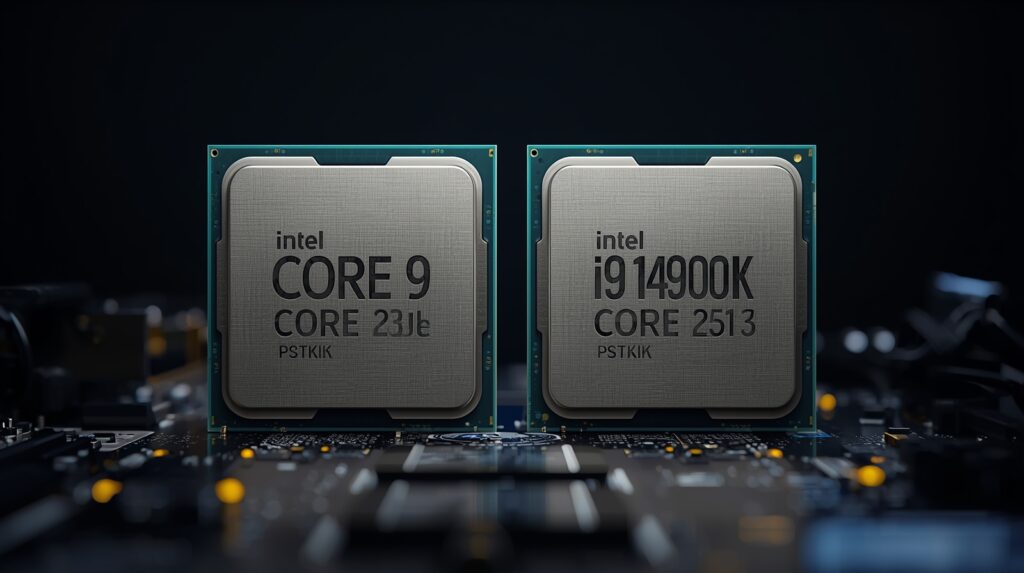
When Intel launches a new CPU generation, the real test comes down to a direct comparison against what came before. Putting the Core Ultra 9 285K against the i9-14900K reveals exactly where your money should go, and whether upgrading makes sense at all.
Intel’s complete rebranding from i9 to Core Ultra signals major changes under the surface. The company wouldn’t abandon its iconic naming scheme without significant architectural shifts. Yet Arrow Lake faces tough competition from its predecessor, which remains a top choice for both gaming enthusiasts and professional workloads.
Comparison Table:
| Use Case | Winner | Performance Gap |
| Gaming (1080p/1440p) | i9-14900K | 8-15% higher fps |
| Content Creation | Ultra 9 285K | 11-12% faster |
| Power Efficiency | Ultra 9 285K | 36% less power |
| Budget Value | i9-14900K | $250-350 cheaper |
| AI Workloads | Ultra 9 285K | 18% faster ML |
| Upgrade Path | Ultra 9 285K | LGA1851 future |
Specification:
| Core Ultra 9 285K | Core i9-14900K | |
| Architecture | Arrow Lake | Raptor Lake Refresh |
| Cores (P+E) | 24 (8P+16E) | 24 (8P+16E) |
| Threads | 24 | 32 |
| Max Boost | 5.7 GHz | 6.0 GHz |
| TDP Range | 125W – 250W | 125W – 253W |
| Socket | LGA1851 | LGA1700 |
| Memory | DDR5 only | DDR5 / DDR4 |
| Price (2026) | $589 | $433 |
The Ultra 9 285K brings Intel’s first major redesign in years, shifting to a modular tile-based layout borrowed from mobile chips. Unlike Raptor Lake’s monolithic design, Arrow Lake splits compute, graphics, and IO into separate tiles connected through advanced packaging. This includes eight Lion Cove performance cores and 16 Skymont efficiency cores, plus a dedicated neural processing unit for AI acceleration. (Intel Core Ultra 9 285K Review – Architecture, 2024)
Clock speeds tell part of the story, with both chips running similar frequencies. The real shake-up comes from Intel dropping hyperthreading on Arrow Lake. By eliminating simultaneous multithreading, Intel reduces transistor count and power draw, though it costs the Ultra 9 285K eight threads compared to the i9-14900K. (Intel Core Ultra 9 285K vs i9-14900K, 2026) The P-core and E-core design philosophy remains, but execution differs significantly.
Pricing creates an interesting dynamic. Intel matched the original $589 MSRP between generations, but the i9-14900K now sells for $433 after a year of market competition. That $156 gap grows substantially when you factor in platform costs, with new LGA1851 motherboards and DDR5 requirements adding to the Ultra 9’s total expense. (Intel Core Ultra 9 285K Review And Performance Breakdown, 2025)
Performance
Testing both processors from scratch on Windows 11 24H2 with the latest BIOS updates provides clean benchmark results. The i9-14900K runs on a Z790 motherboard while the Ultra 9 285K uses Z890, each paired with an RTX 4090 to isolate CPU performance across synthetic benchmarks and real-world testing scenarios.
Productivity
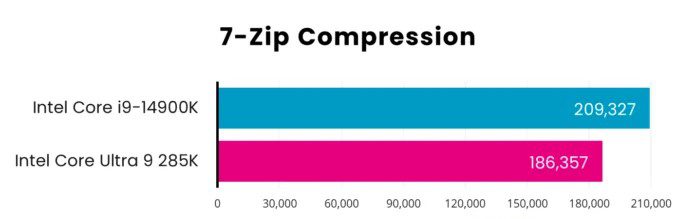
Despite similar core counts on paper, the thread advantage gives Raptor Lake an edge in certain workloads. The i9-14900K pulls ahead by 12% in 7-Zip compression tests, scoring 209,327 MIPs against the Ultra 9’s 186,457 MIPs. (Intel Core Ultra 9 285K vs i9-14900K, n.d.) Hyperthreading proves its worth in heavily threaded compression algorithms.
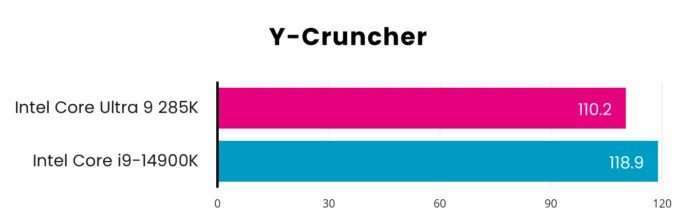
Arrow Lake’s improved efficiency cores shine in compute-intensive tasks. Y-Cruncher computation times drop 7% on the Ultra 9 285K at 110.2 seconds versus 118.9 seconds for the i9. (Intel Core Ultra 9 285K vs. Intel Core i9-14900K, 2025) Those redesigned Skymont cores handle mathematical workloads more effectively than their predecessors.
Geekbench 6 reveals modest gains for the Ultra 9 285K in both single-core performance and multi-core performance. The Arrow Lake chip scores 3,345 in single-threaded tests versus 3,246 for Raptor Lake, a 3% advantage. Multi-core results show 22,075 against 21,816, again just 1% separation. (Intel Core Ultra 9 285K Benchmarks – Geekbench, 2026) These productivity scores place Arrow Lake ahead of everything else we’ve tested, though the margin stays thin.
Intel’s push into AI acceleration shows clear benefits in machine learning tests. The dedicated neural processing unit helps the Ultra 9 285K achieve 6,520 in Geekbench ML versus 5,527 for the i9-14900K, an 18% lead. (Intel Core Ultra 9 285K Benchmarks – Geekbench, 2026) Even though these tests primarily stress the CPU rather than the NPU, architectural improvements for machine learning workloads prove substantial.
Rendering
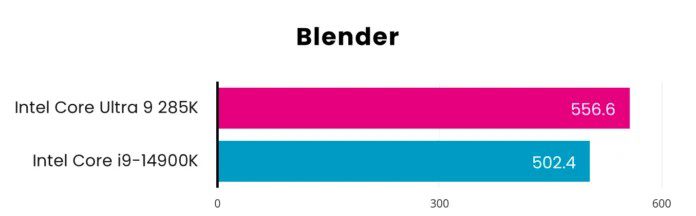
Blender rendering showcases Arrow Lake’s multi-core strength with an 11% performance advantage. The Ultra 9 285K achieves 556.6 samples per minute compared to 502.4 for the i9-14900K. More impressive is the 64W power reduction during these extended workloads, proving Intel’s efficiency claims hold up under sustained loads. (Intel Core Ultra 9 285K Review in 2026)
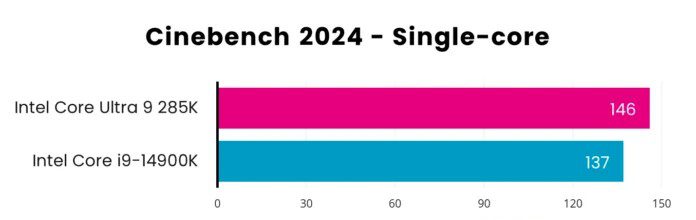
Cinebench 2024 benchmark results strongly favor the newer architecture. Single core tests show a 6.6% advantage at 146 versus 137, while multi core performance jumps 11.8% with scores of 2,426 against 2,169. (Intel Core Ultra 9 285K vs Intel Core i9-14900K, 2026) The Ultra 9 285K currently tops our testing charts in this demanding renderer, outpacing not just its predecessor but competing chips from AMD as well
Corona 10 rendering demonstrates similar patterns with 12% better performance at 13.54 million rays per second versus 12.06 million. Adobe PugetBench shows more modest improvements with Photoshop scoring 9,915 compared to 9,750, while Premiere Pro comes in at 15,126 versus 14,296. The gap narrows in these real-world applications to just 1.7%, suggesting software optimization plays a role in extracting maximum performance. (Intel Core Ultra 9 285K vs i9-14900K, 2026)
Memory
AIDA64 memory benchmarks reveal mixed results for Arrow Lake. Read speeds slightly favor the Ultra 9 285K at 94,873 MB/s versus 94,518 MB/s, but write performance drops to 85,397 MB/s compared to 88,438 MB/s. The concerning metric appears in latency tests, where the tile-based design introduces 88.4 nanoseconds versus Raptor Lake’s 69.6 nanoseconds. This roughly 30% latency increase directly impacts gaming performance, particularly in CPU-bound scenarios where every nanosecond counts. (Intel Core Ultra 9 285K vs Intel Core i9-14900K, 2025)
Gaming
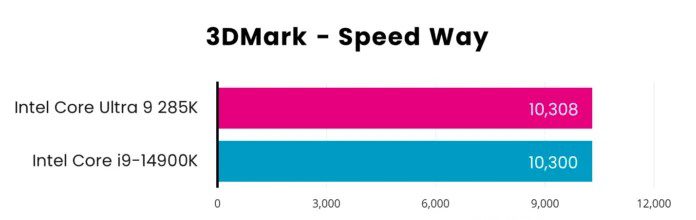
Let’s address the elephant in the room for gaming performance tests. With an RTX 4090 handling graphics, the i9-14900K delivers consistently better fps benchmarks across most titles. Synthetic tests like 3DMark Speed Way show both chips neck and neck at 10,308 versus 10,300, but real games tell a different story.
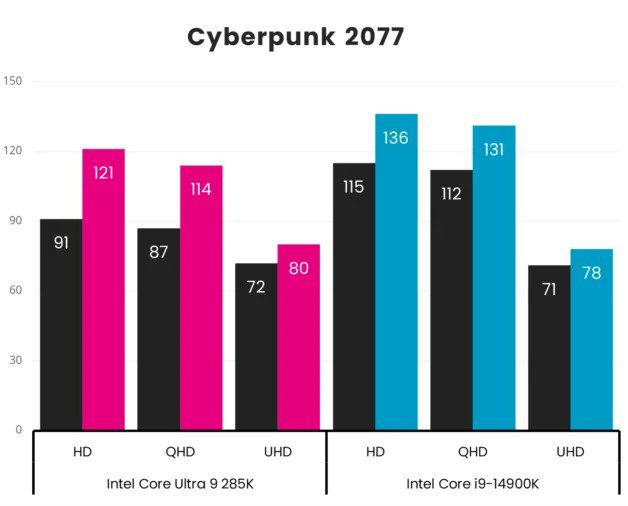
Cyberpunk 2077 at 1080p game performance highlights the memory latency penalty. The i9-14900K pushes 137 fps while the Ultra 9 285K manages 126 fps, an 11-frame gap you’ll notice on high refresh displays. At 1440p game performance, the difference grows to 17 frames. (Core Ultra 9 285K Review in 2026) These CPU-bound games expose Arrow Lake’s weakness, with that extra 30 nanoseconds of latency creating micro stutters that competitive gamers will feel.
Assassin’s Creed Valhalla shows smaller differences, with roughly 7 fps separating the chips at any resolution. Final Fantasy XIV Dawntrail prefers Raptor Lake by a few frames. (Intel Core Ultra 9 285K vs. Intel Core i9-14900K | Club386, 2024) These tighter margins suggest optimization and game engine architecture matter as much as raw CPU performance.
Forza Motorsport flips expectations with the Ultra 9 285K pulling ahead by 4-5 fps. Not a huge margin, but any improvement counts. The real surprise comes in Mount & Blade II: Bannerlord, where Arrow Lake dominates with 30 fps more at 1440p, 23 fps at 1080p, and 9 fps at 4K game performance. (Intel Core Ultra 9 285K: 25% faster than i9-14900K in V-Ray benchmarks, 2024) Real-time strategy titles clearly benefit from the new architecture’s efficiency cores. Don’t expect such dramatic wins in GPU-bound games, though, as these results represent the exception rather than the rule.
Overall CPU gaming results clearly favor the i9-14900K for mainstream titles and competitive scenarios. The memory latency penalty hurts Arrow Lake in fast-paced games where frame time consistency matters most.
Efficiency
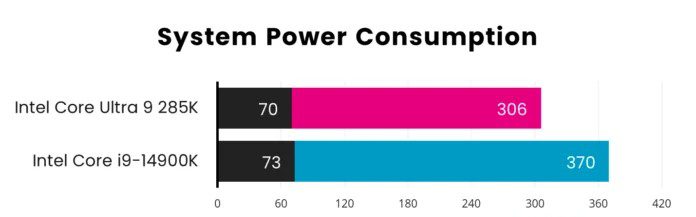
Intel delivers on efficiency promises with the Ultra 9 285K, reducing system power consumption by 36% at default settings. Under full load, the new chip draws 306W versus 370W for the i9-14900K. Over a year of 8 hours of daily usage, this saves roughly 263 kilowatt hours. At average electricity rates, expect $30-50 in annual savings.
The catch? You could limit the i9-14900K’s power draw through BIOS settings without sacrificing much performance per watt. Both chips idle identically at 70-73W, where systems spend most of their time. The efficiency gains matter most for workstations running intensive applications all day or small form factor builds with limited cooling capacity.
Lower power draw naturally means better thermal efficiency. The Ultra 9 285K runs at 80°C under sustained loads versus 92.8°C for the i9-14900K, a 13% temperature reduction. (Intel Core Ultra 9 285K Review And Performance Breakdown (2025), 2025) While not reaching AMD Zen 5 levels of coolness, staying under 85°C prevents thermal throttling even in demanding applications like extended Cinebench runs.
Platform Costs
The $156 CPU price gap only scratches the surface of total platform expenses. Building with the Ultra 9 285K requires a new LGA1851 motherboard, with entry-level Z890 boards starting at $200 and quality models with robust power delivery hitting $300-350. Meanwhile, mature Z790 motherboards for the i9-14900K sell between $150-250. (Intel Core Ultra 9 285K Review, 2026)
Memory compatibility adds another cost layer. The i9-14900K supports both DDR5 and DDR4, letting you reuse existing RAM. The Ultra 9 285K demands DDR5 only, forcing a $110-150 investment for decent 32GB kits. (Intel Core Ultra 9 285K Processor, 2024) If you’re sitting on 32GB of DDR4, that’s pure savings with Raptor Lake.
Calculate the complete platform, and you’re looking at $250-350 more for Ultra 9 285K builds. That difference buys you a better graphics card or doubles your storage. The price-to-performance ratio heavily favors the i9-14900K when accounting for real-world system costs. (TheCore 9 Ultra 285K is Intel’s fastest CPU and costs under $500 – so why is it so much cheaper compared to AMD $679 Ryzen 9 9950X3D, 2026)
Value
Our efficiency rating divides Cinebench 2024 multi-core scores by power draw, revealing the Ultra 9 285K’s 35% advantage at 7.93 versus 5.86. For performance per watt metrics, Arrow Lake dominates. Switch to our value rating using launch prices, and the margin shrinks to just 3.5% at 3.81 versus 3.68. Factor in current street pricing of $433 for the i9-14900K though, and its value metrics jump to 4.89, crushing the Ultra 9 by 28%. (Intel Core Ultra 9 285K vs Intel Core i9-14900K – Benchmark, comparison and differences, 2026)
FAQ’s
Is Core Ultra 9 the same as i9?
No. Core Ultra 9 represents Intel’s new architecture replacing the i9 naming scheme. The Ultra 9 uses a tile-based design with dedicated NPU for AI acceleration, while i9 uses traditional monolithic architecture. Both target high-end performance but differ in efficiency and feature sets.
What is the difference between Intel 14th Gen and Intel Ultra?
Intel 14th Gen (Raptor Lake Refresh) uses proven monolithic architecture with hyperthreading and supports DDR4/DDR5. Core Ultra (Arrow Lake) features tile-based design, drops hyperthreading, requires DDR5 only, and adds dedicated AI acceleration. Ultra prioritizes efficiency while 14th Gen focuses on raw performance.
Is i9-14 HX better than Ultra 9?
For gaming, the i9-14900HX delivers 8-15% higher frame rates due to lower memory latency. For content creation, Ultra 9 wins with 11-12% faster rendering and 36% lower power consumption. The i9-14 HX excels in mobile gaming, while Ultra 9 suits professional workflows requiring efficiency.
Is Core Ultra 9 the same as i9?
No. Core Ultra 9 represents Intel’s new architecture replacing the i9 naming scheme. The Ultra 9 uses a tile-based design with dedicated NPU for AI acceleration, while i9 uses traditional monolithic architecture. Both target high-end performance but differ in efficiency and feature sets.
What is the difference between Intel 14th Gen and Intel Ultra?
Intel 14th Gen (Raptor Lake Refresh) uses proven monolithic architecture with hyperthreading and supports DDR4/DDR5. Core Ultra (Arrow Lake) features tile-based design, drops hyperthreading, requires DDR5 only, and adds dedicated AI acceleration. Ultra prioritizes efficiency while 14th Gen focuses on raw performance.
Is i9-14 HX better than Ultra 9?
For gaming, the i9-14900HX delivers 8-15% higher frame rates due to lower memory latency. For content creation, Ultra 9 wins with 11-12% faster rendering and 36% lower power consumption. The i9-14 HX excels in mobile gaming, while Ultra 9 suits professional workflows requiring efficiency.
Is Intel Core Ultra 9 285K better than i9-14900K?
It depends on your workload. The i9-14900K wins for gaming with better fps and costs $250-350 less total. The Ultra 9 285K excels in content creation with 11-12% faster rendering, 36% lower power draw, and AI acceleration. Choose i9 for gaming, Ultra 9 for professional work.
Buying Recommendations
Choose the i9-14900K for:
- Gaming-focused builds where maximum fps matters, especially in competitive titles
- Budget-conscious systems where $250-350 platform savings enable better GPU or storage
- Existing DDR4 memory you can reuse, avoiding $110-150 RAM costs.
- Standard tower cases with adequate airflow, where efficiency matters less
- Complete platform replacement planned in 3-4 years, regardless of upgrade path
Choose the Ultra 9 285K for:
- Professional content creation with heavy video editing, 3D rendering, or CAD work
- Systems running demanding applications 8+ hours daily, where power efficiency provides ROI
- Small form factor or compact builds where thermal efficiency and lower power draw prove critical
- AI accelerated workflows in Adobe Creative Cloud, DaVinci Resolve, or other NPU-optimized applications.
- Future upgrade flexibility with the LGA1851 socket supporting next-generation processors
Final Verdict
The Core Ultra 9 285K prioritizes efficiency over raw gaming performance, and it shows. Content creators gain 11-12% faster rendering with dramatically lower power draw, while the dedicated NPU accelerates AI workflows in Adobe and DaVinci Resolve. Gamers on recent platforms have little reason to upgrade.
If you’re running a 14900K already, stay put. Recent microcode fixes solved the voltage issues, and the mature platform delivers excellent performance. You can even match the Ultra 9’s efficiency through BIOS power limits without losing much capability.
Upgrading from older systems? The i9-14900K makes more sense for most builders. It costs $250-350 less when you factor in the motherboard and memory, money that is better spent on graphics or storage. The Ultra 9 285K offers LGA1851 future-proofing and superior efficiency, but only content creators running demanding workloads of 8+ hours daily will see a real return on that premium. Gamers chasing high refresh rates should grab the i9-14900K without overthinking it.
Testing Methodology
Performance data from independent testing using Windows 11 24H2, RTX 4090 at 1080p/1440p/4K, with 12 runs per test across three passes. Benchmarks include Cinebench 2024, Geekbench 6, 3DMark, Blender, 7-Zip, Adobe PugetBench, Y-Cruncher, and AIDA64 memory tests.
Gaming tested across Cyberpunk 2077, Assassin’s Creed Valhalla, Forza Motorsport, Final Fantasy XIV, and Mount & Blade II. Power measured at the wall outlet with adequate cooling. Results verified against TechSpot and Club386 data. Pricing from Amazon/Newegg 2026.